The trading journal for crypto futures

Trade your plan.
Fix your habits.

HigherLow sizes every trade correctly, keeps an honest record of why you took it and how you felt, and shows you the habits that quietly cost you money, on your phone and on your computer.

Works in your browser and installs on your phone's home screen. No download needed.

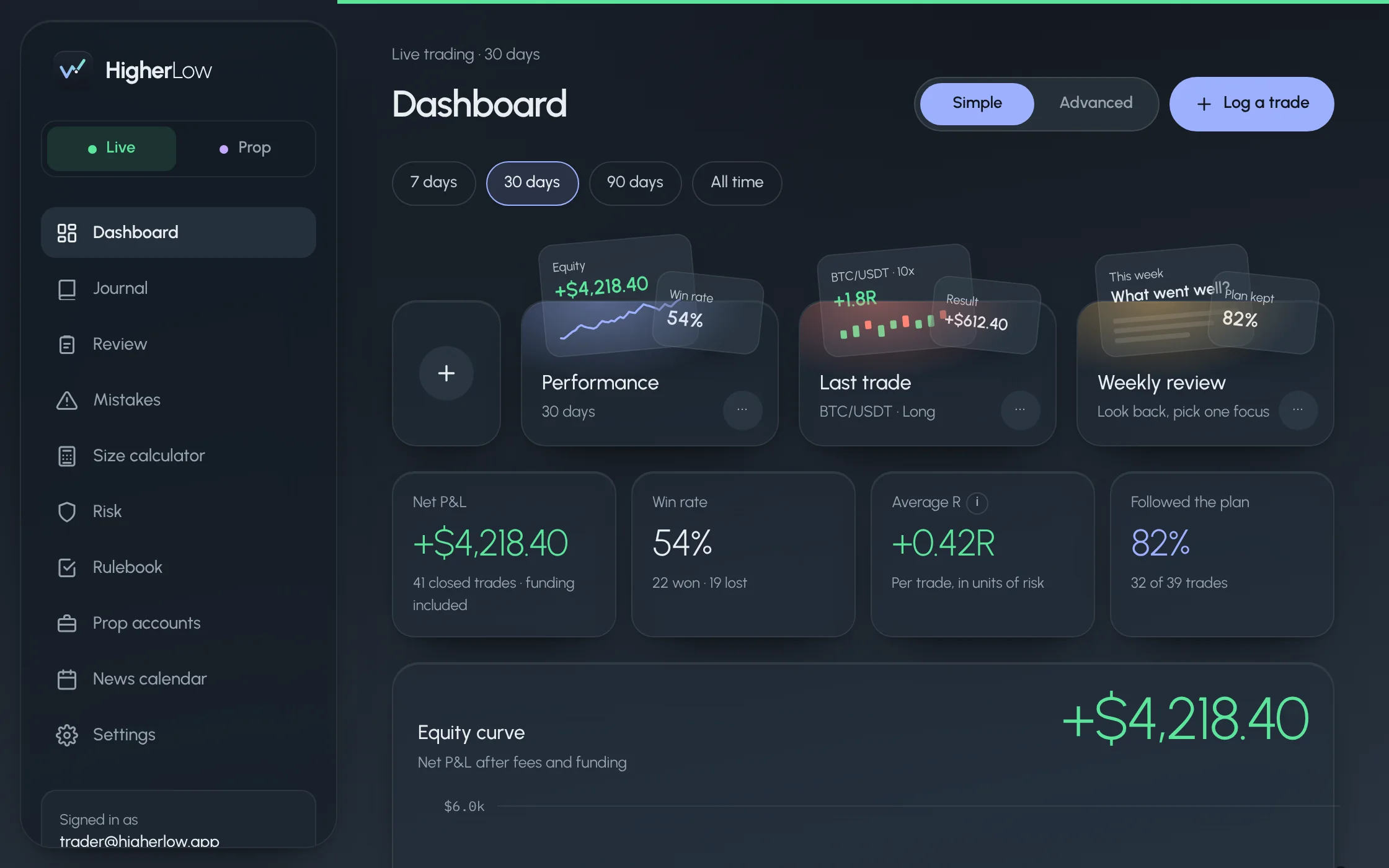
HigherLow dashboard on a laptop
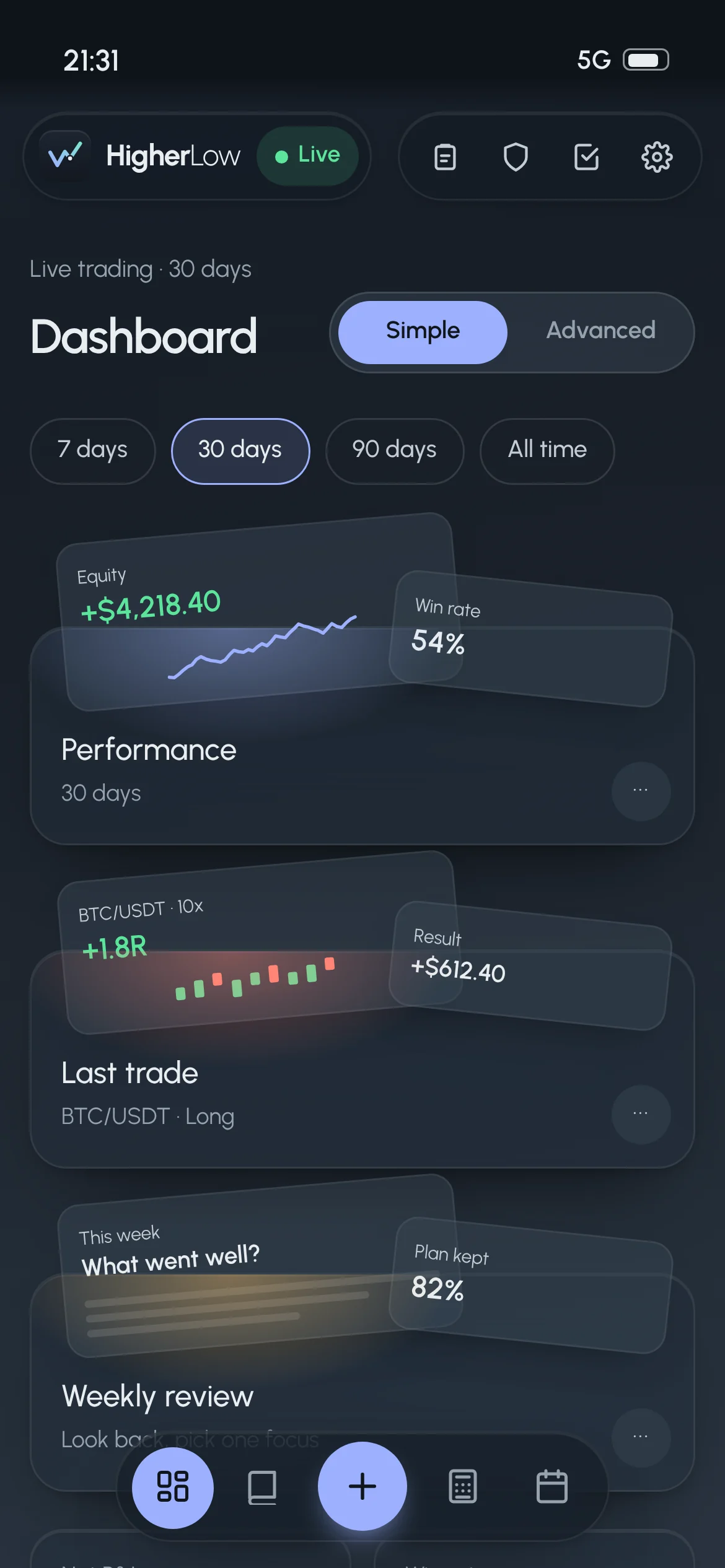
HigherLow dashboard on a phone
Everything in one place

Built around the way you actually trade

Four parts, one loop: plan the trade before you enter, log it in seconds, review what really happened, and protect your account while you trade. Every screen below is the real app.

1Plan · Size calculator

The right size for every trade, before you click buy

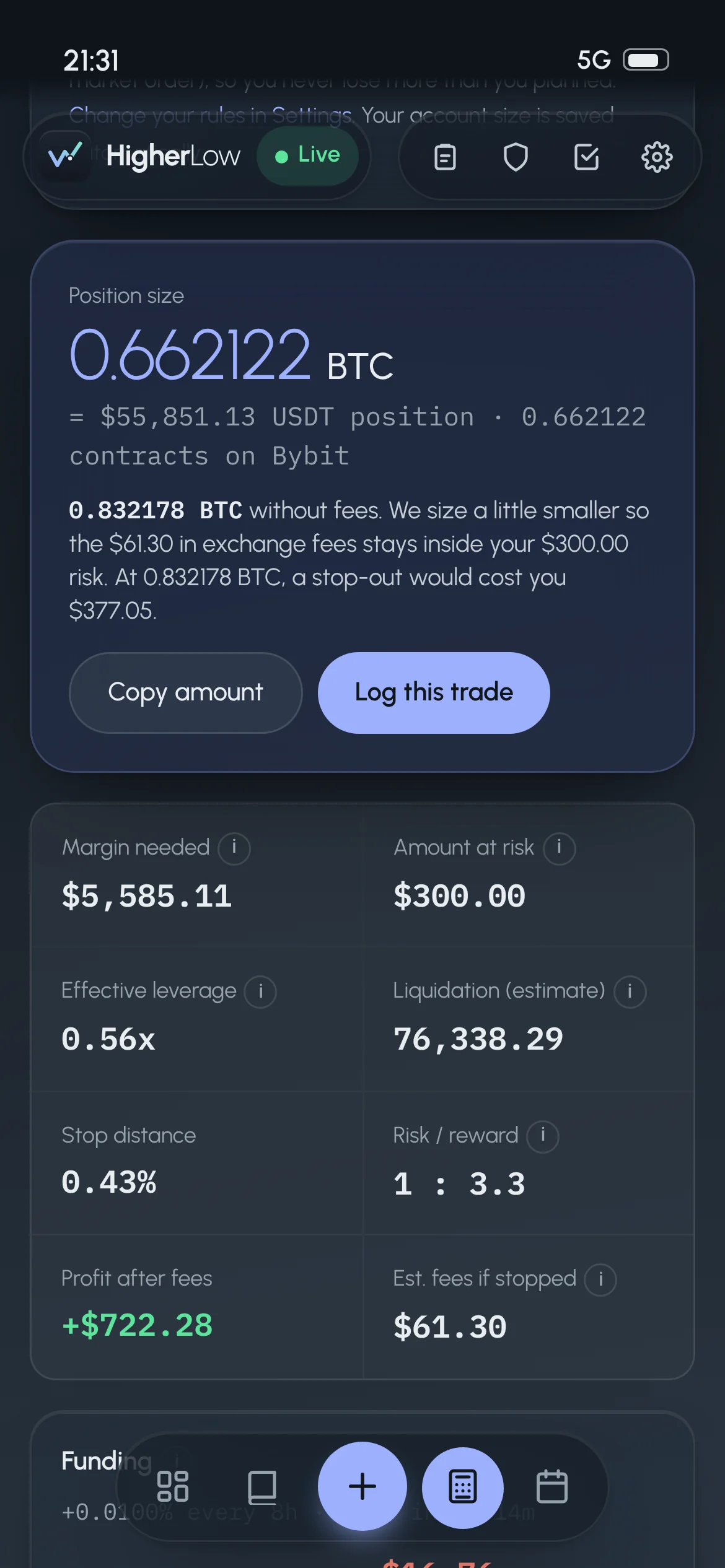
Pick a pair and HigherLow fetches the live price. Enter your stop, your target and how much of your account you want to risk, and it tells you exactly how many coins to buy.

  • Coin amount first. The size shows big in coins (0.909504 BTC), with the USDT value and the contract count underneath, plus Copy amount and Log this trade.
  • Fees already counted. Pick Market or Limit for your entry and the exchange fee is included, so a stop-out never costs more than you planned.
  • Typos fixed for you. Type 839912 instead of 83,991.2 and it reads the price correctly, using the live price as a guide.
  • Everything worked out: margin needed, amount at risk, effective leverage, liquidation, stop distance, risk/reward, profit after fees and fees if stopped.
  • Funding estimate for your planned hold time, and a scale-out plan with three take-profit levels.
  • Your rules, checked. Green ticks when risk and leverage are within your Rulebook, and a warning if liquidation comes before your stop.
Calculator inputs with entry, stop and take profit
Position size with margin, risk and profit after fees
2Log · Journal

A journal that asks the questions a coach would

Logging takes under a minute, and the calculator fills in the numbers. What you add is what makes you better: why you took the trade and how you felt.

  • Why you took it. Tap a setup like Break & retest or Liquidity sweep, or write your own.
  • Feelings before and after. Calm, Confident, FOMO, "Want to win it back"… The Dashboard later shows which feelings make or lose you money.
  • What would prove you wrong. Write your invalidation before you enter, so you know your exit.
  • Did you follow your plan? A simple Yes / No when you close, and the Dashboard shows what breaking the plan cost.
  • Chart screenshots by tap, paste or drag. Draw on them with a pen, arrows, boxes, price levels and text.
  • Fees, funding and your result in R are calculated for you, with the session (Asia, London, New York) added.
Log a trade: setup and feelings
Limit order waiting for fill
3Log · Reminders at the top

Small reminders that keep you out of trouble

Two kinds of bar appear at the top of every page when they matter. They stack neatly so they never overlap, and disappear by themselves.

  • News countdown. When the Fed, CPI or the jobs report is less than 24 hours away, a bar counts down to the second: "Fed interest rate decision at 20:00, in 3h 12m 08s".
  • Turns red in the last hour, with a reminder that spreads widen and stops can slip. For 15 minutes after the release it says "Just released: expect fast moves".
  • Limit orders waiting for a fill. A logged limit order waits instead of counting as an open position. A yellow bar lists it with Filled now and Cancelled.
  • Daily limits. Set a daily loss or a max number of trades, and a red box tells you when you've hit your own limit for the day.
High-impact news very soonCalendar
Fed interest rate decision at 19:00in 12m 08s
Spreads widen and stops can slip around the release.

Shown 24 hours before big news, above any other bar

Limit order reminder at the top of the dashboard
4Review · Dashboard

Honest numbers, in a view that makes sense

Every result includes fees and funding and is measured in R, your risk unit, so a small trade and a big one compare fairly.

  • Simple view: net P&L, win rate, average R, how often you kept your plan, your equity curve and your biggest leaks.
  • Advanced view: expectancy, profit factor, max drawdown and how long it took to recover, losing streaks, fees and funding totals.
  • Breakdowns by setup, session, pair and feeling. Swipe tables sideways or tap the round arrows.
  • Peek cards for your performance, your last trade and your weekly review, one tap away.
  • Live and Paper kept apart. Practice trades never mix with real ones; switch with one tap.
HigherLow dashboard, Advanced view
5Review · Mistakes detector

See the habits that cost you money, with a price on each

HigherLow reads your trades the way a coach would and points out patterns you don't see one trade at a time. The most expensive habit comes first.

  • Revenge trading: a new trade within an hour of a loss, or logged with "Want to win it back".
  • Moved the stop further away: caught when you edit an open trade. Your original risk is kept, so the result stays honest.
  • Bigger size after a loss, adding to a losing trade, too many trades in a day, entries on FOMO or boredom, going above your max leverage.
  • Weak session: "You lose money in the Asia session but make money in the others."
  • Closing winners too early: winners closed less than halfway to your target.
  • One fix per habit, like "After a loss, take a break of at least an hour", plus a warning on the trade itself.
21:015G ▮
HigherLowLive
Live trading · 90 days
Mistakes
30 days90 daysAll time

14 of 41 trades show at least one mistake and the losing ones cost you −$1,240. The most expensive habit is first.

Revenge trading
Trades opened within 60 minutes of a loss.
−$612
3 trades · −1.1R avg
Try this: After a loss, take a break of at least an hour before the next trade.
Show the trades
Moved the stop further away
You moved the stop loss away from your entry.
−$388
2 trades · −1.6R avg
Try this: A stop may only move toward profit, never away from it.
6Review · Replay and reviews

Watch your trade again, candle by candle

Press Replay on any trade and it plays back on real market candles, from before your entry to after your exit, with your entry, stop, target and exit drawn on the chart.

  • Play, pause, step, change speed (1× to 8×), drag the slider, or jump back to your entry.
  • While it plays, the corner shows how far up or down the trade was at that moment, in R.
  • At your exit, a summary: the best and worst point while you were in, whether your stop or target was hit, and how far price went after you closed.
  • "Did you move it?" If price traded through your stop but you closed better, it asks.
  • Weekly and monthly reviews with your numbers filled in: what went well, what went wrong, discipline 1 to 5, and one thing to work on next.
‹ Journal
BTC/USDT · Long 10x
Live tradingOpened Wed 21 Oct, 20:17 · New York session
+$612.40 +1.8R
5m15m1h
Open now: +1.4R
TP 85,536 IN 84,351.7 SL 83,991.2
⏮ Entry‹Pause›End ⏭1× 2× 4× 8×
While you were in, price went up to +2.3R in your favour and −0.6R against you. Your target was reached at 21:05. After you closed, price reached +3.1R.
7Protect · Risk

Know what you stand to lose, before it happens

The Risk page watches your open trades with live prices and adds up what you'd lose if every stop hit. A simulator shows whether your risk per trade can survive a losing streak.

  • Every open position: live price, unrealized P&L after fees, margin, distance to your stop and to liquidation, and funding per payment.
  • Totals: what you'd lose at your stops, margin used and effective leverage, with meters against your account and your daily limit.
  • Warnings for a trade without a stop, liquidation before your stop, too much margin in use, or open risk above your daily limit.
  • Risk of ruin: your own win rate and R played 2,000 times, showing your chance of losing half your account.
  • Your Rulebook: max risk per trade, max leverage, daily loss limit and max trades per day, checked everywhere.
Live trading
Risk
Open positions
Unrealized P&L+$307after estimated fees
Lose if all stops hit i$600.000.6% of account
Margin used i$11,17011.2% of account
Effective leverage i1.1x$111,702 in positions
Account used as margin11.2%
Open risk vs daily loss limit30%
BTC/USDT Long 10x+$364.20
Entry → now
84,351.7 → 84,902.0
To stop
0.43%
To liquidation
9.6% (76,338)
ETH/USDT Short 5x−$57.10
Entry → now
2,369.98 → 2,381.40
To stop
1.10%
To liquidation
19.1% (2,833)
8Plan · News calendar

Never get caught by the Fed again

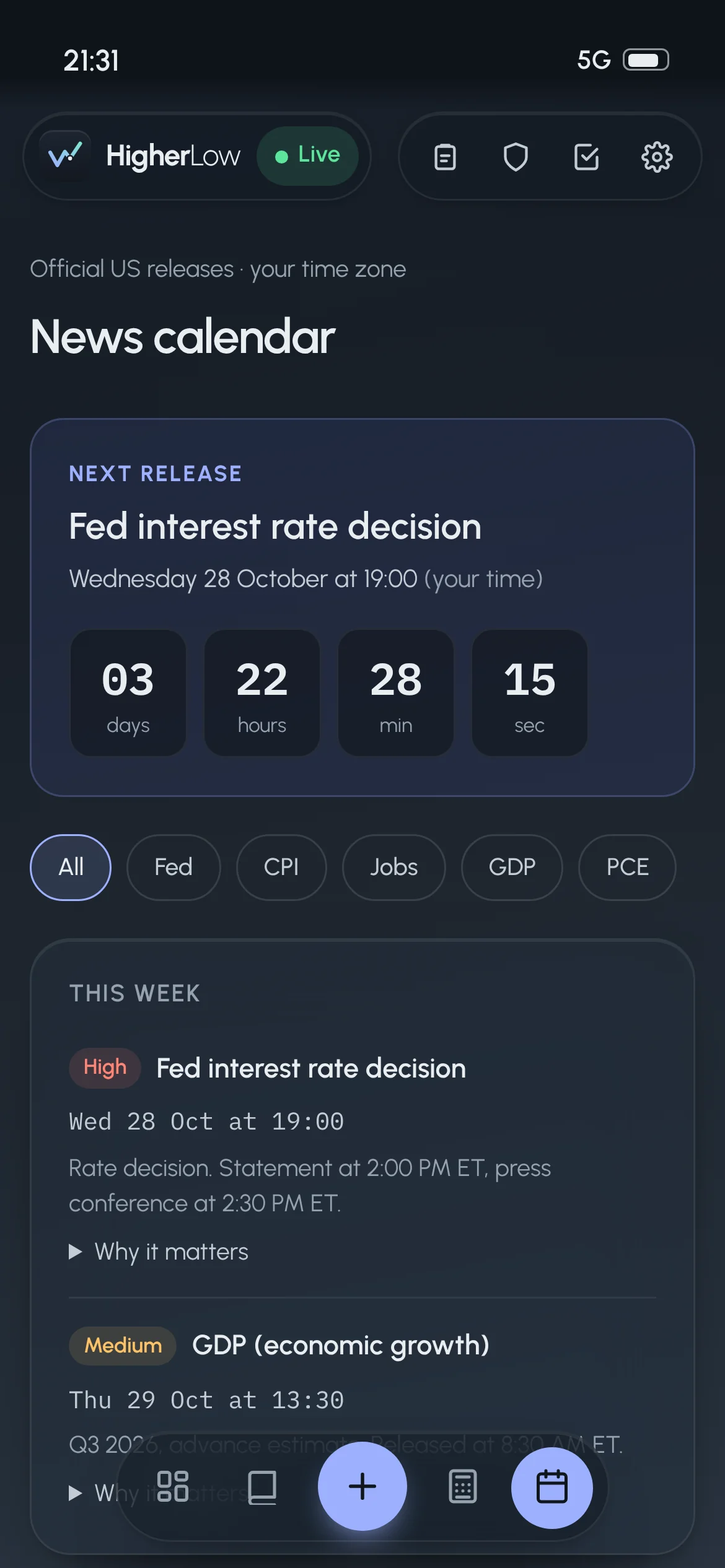
The releases that move crypto, from the official US schedules, shown in your own time zone, with a plain explanation of why each one matters.

  • Fed rate decisions, CPI inflation, the jobs report, GDP and PCE, each marked High or Medium impact.
  • A big live countdown to the next release, and a filter for each type.
  • "Why it matters" under every event, written for traders still learning, with a link to the official schedule.
  • Trading around news: simple rules, like no new trades from 30 minutes before until 15 minutes after.
  • Checked every month against the official schedules, so moved or new dates are always up to date.
News calendar with countdown
Upcoming releases with why it matters
Pricing

Start free. Upgrade when it pays for itself.

One avoided revenge trade usually covers a year of Pro.

Starter

€0forever

Everything you need to start journaling properly.

  • Size calculator with live prices and fees
  • Up to 30 trades a month
  • Dashboard (Simple view)
  • News calendar and countdown
  • Live and Paper modes
  • Mistakes detector
  • Trade replay and reviews
  • Risk tools and Advanced view
Start free
Most popular

Pro

€12/ month

Billed monthly. Cancel any time.

  • Everything in Starter
  • Unlimited trades and screenshots with drawing
  • Mistakes detector with costs and fixes
  • Trade replay on real candles
  • Weekly and monthly reviews
  • Risk page and risk-of-ruin simulator
  • Advanced view and all breakdowns
  • Exchange import when it launches
Try Pro free for 14 days

Plans and prices are an example and not final yet.

Questions

Good to know

Which markets does HigherLow support?

Crypto futures and perpetuals quoted in USDT. Live prices and funding come from major exchanges, and fees are estimated with standard exchange rates. You can always enter the exact fees you paid.

Does it connect to my exchange?

Not yet. You log trades yourself, which takes under a minute from the calculator. Automatic import from exchanges is planned.

Can I use it on my phone?

Yes. Open HigherLow in your phone's browser and add it to your home screen. It opens full screen with its own icon, like an app.

Is my data private?

Your trades and screenshots are tied to your account and only you can see them.

Is this financial advice?

No. HigherLow is a journal and planning tool. It never tells you what to trade.

Your next higher low starts with your next trade